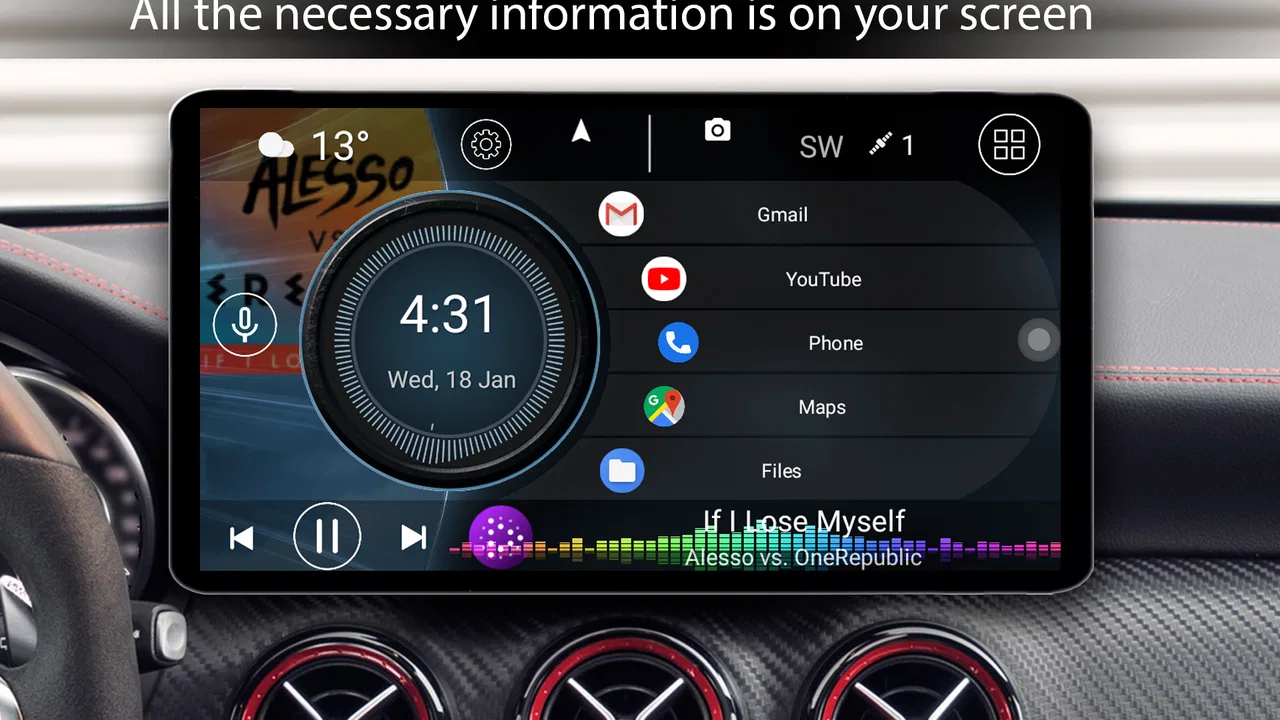
Car Launcher
- 4.3
- Rating
- 1.00M
- Installs
- Free
- Price

 Analysis by App-foxy
Car Launcher is the kind of Android app I would consider when the phone has to become a practical dashboard rather than a general-purpose home screen. Developed by Apps LabDev, it sits in the Auto & Vehicles category and focuses on making common driving-related actions easier to reach. I found the idea more useful than a normal launcher when the phone is mounted in the car, because the whole experience is meant to be read and operated at a glance instead of explored like a regular smartphone.
The app is free and rated for Everyone, which makes it easy to try without turning the decision into a purchase. Its long availability, beginning on June 23, 2015, also gives it a more established feel than a brand-new dashboard experiment. The current version is 5.5.0.85, and it can run on Android 5.0 or later. That broad system compatibility is important for drivers using an older spare phone as a dedicated in-car screen.
What the dashboard changes in everyday driving
My first impression is that the value of Car Launcher depends less on adding spectacular technology and more on reducing the number of taps needed for familiar tasks. A typical phone home screen is designed around app discovery, notifications, widgets, and personal content. In a vehicle, that can feel cluttered. A launcher built specifically for the car creates a more focused starting point, where the phone is treated as part of the driving setup.
You May Also Like

 Blood Strike: 2.5 Anniversary
Blood Strike’s Loadouts Turn Every Drop Into a Tactical Gamble
A close look at Blood Strike’s custom loadouts: how fast access to signature weapons reshapes its battle royale rhythm, rewards preparation, and narrows the gap between fights.

 Pandora - Music & Podcasts
Pandora’s Music Is Easy to Start, but Harder to Recover
Pandora’s strength is its low-effort path from a seed to a station. Its weak spot is how much confidence it asks you to place in connection, setup, and quiet recovery.

 8 Ball Pool
 Is Built on Rivalries, Rematches, and Routine
A close look at the rivalries, rematches, shared routines, and unanswered safety questions that turn a quick pool match into a persistent mobile community.

 Samsung Music
’s Quiet Strength Is Playing What You Already Own
Its reach comes less from spectacle than from dependable access to a personal library. That simplicity is both the app’s strongest retention engine and its ceiling.

 AccuWeather: Weather Radar
AccuWeather Review: A Quick, Clear Forecast for Everyday Decisions
For everyday plans, the best forecast is the one you can understand quickly. AccuWeather makes rain timing, radar, and local conditions easy to act on, with a few trade-offs.

 Hill Climb Racing
Why Hill Climb Racing Still Turns Crashes Into One More Run
A tiny car, a bumpy hill and one more upgrade: Hill Climb Racing keeps resurfacing because its simple chaos makes every near-miss feel personal.
More From Our News Desk
View All News


That distinction matters most when the device is mounted near the dashboard. A large, purpose-built layout can make the most relevant controls easier to identify, while a conventional launcher often forces me to hunt through small icons. I would not describe this as a replacement for safe driving habits; it is still important to set everything up before moving. The practical benefit is that the phone feels less like a pocket computer and more like a dedicated car interface.
The app has attracted more than a million installs and holds a 4.3 average from roughly eighty-five thousand ratings. Those figures suggest that the concept has reached well beyond a tiny group of enthusiasts. I still think the rating should be read alongside the type of phone and mount being used, because a launcher can feel excellent on a large, bright display and much less comfortable on a cramped or slow one.
Where connectivity becomes part of the experience
Car Launcher does not exist in isolation from the rest of the phone. The moment I use it for navigation, music, calls, or another connected driving task, the quality of the overall experience depends on the apps opened from that dashboard and on the phone’s connection. The launcher can organize access, but it does not remove the practical differences between a strong mobile signal, a weak one, and no connection at all.
This is the first important trade-off: a clean car interface can make connected services easier to reach, but it cannot guarantee that those services will behave consistently. A navigation app may need current map information, a music service may need access to its library, and voice-related functions may depend on the selected application. I would therefore judge Car Launcher as the front door to a connected setup, not as a complete connectivity solution.
That separation is useful when troubleshooting. If the dashboard opens normally but a destination fails to load, the problem is more likely related to the navigation app, mobile data, or the phone itself than to the launcher’s basic role. Keeping that distinction in mind prevents a common mistake: blaming the interface for every failure that happens after tapping an app shortcut.
A realistic morning commute
Imagine using an older Android phone as a permanent car device. Before leaving home, I would connect the phone to its charger, place it in the mount, and open the launcher. The main advantage is not that the route suddenly becomes better; it is that I begin from a screen designed for the vehicle rather than from a crowded personal home screen. I can then launch navigation or another driving tool without first sorting through unrelated apps.
On a short commute, that quicker starting point is easy to appreciate. On a longer trip, the difference becomes more noticeable because the phone may be used repeatedly for directions, audio, and calls. A dedicated dashboard also helps separate driving tasks from personal phone activity. I am less tempted to browse unrelated notifications when the screen presents itself as a car tool.
There is a subtle limitation, though. The launcher can simplify access, but it does not make every connected service equally comfortable. If the next step requires typing a long address, signing into an account, or changing a complicated setting, I would still do that while parked. A larger interface reduces friction; it does not turn a phone into a fully hands-free system.
Using it with an older or spare phone
One of the strongest use cases is repurposing a spare Android device. Because the minimum requirement is Android 5.0, owners of older phones may have an option that is unavailable with newer, heavier automotive software. I like this approach for people who do not want to expose their main phone to constant mounting, heat, vibration, or charging in the car.
That setup needs realistic expectations. An older device may launch the launcher comfortably while struggling with modern navigation or media applications. The interface can make the phone feel more organized, but it cannot upgrade the processor, screen brightness, battery condition, GPS behavior, or network hardware. In this situation, I would test the complete chain: startup, connection, navigation, audio, and charging, rather than judging the launcher on its own.
A spare phone also raises a data-conscious question. If it uses mobile data, I would avoid leaving every connected service active all the time. I would open navigation only when needed, limit background activity where practical, and check which applications are actually responsible for data use. Car Launcher can serve as a focused entry point, but the phone’s broader Android settings remain the place to manage network consumption.
What happens when the connection is unreliable
The most revealing part of any car setup is not the smooth trip; it is the moment something fails. A weak signal can make a connected app slow to respond, while a Bluetooth or charging problem can make the phone appear less dependable even when the launcher itself is working. I found it helpful to treat these as separate layers instead of repeatedly reopening the same screen.
My recovery routine would be simple. First, check whether the launcher responds normally. Then check the specific app that failed, followed by the phone’s connection and power status. If navigation is the issue, I would stop safely before changing settings. If the phone has become unresponsive, a restart may be more productive than tapping several icons. This sounds basic, but a dashboard layout makes the diagnosis clearer because there are fewer unrelated elements competing for attention.
Another useful habit is to prepare before driving through areas where coverage may be inconsistent. Since the launcher is an interface rather than a promise that every connected service will work everywhere, I would open the required navigation or media tools in advance and understand how those individual apps behave when their connection changes. That preparation is especially important for a long journey or an unfamiliar route.
There is also a difference between an app failing and a phone being overloaded. A device running navigation, audio, location services, charging, and a bright display can become warm or sluggish. Car Launcher may make the front screen more efficient to use, but it does not remove the workload created by those other processes. If an older phone feels unstable, I would reduce the number of simultaneous tasks before deciding that the launcher is unsuitable.
Keeping the connected setup manageable
I would not install Car Launcher simply because the phone is used in a car. The best reason is that I want a dedicated starting environment. If the standard home screen already gives me quick access to the exact tools I use, the change may be modest. The app becomes more compelling when the phone is mounted, shared between drivers, used as a secondary device, or kept permanently in the vehicle.
For a cleaner setup, I would begin with only the applications that genuinely belong in the car. Navigation, audio, calling, and vehicle-related tools make sense; social feeds and shopping apps do not need prominent placement. This is more than an appearance preference. Fewer visible choices reduce distraction and make it easier to notice which service is responsible when something stops working.
Connectivity also affects battery planning. A launcher cannot compensate for a poor cable, an unreliable power adapter, or a tired battery. Before a long drive, I would test charging while the screen is active and connected services are running. If the battery still drops, the issue is in the power arrangement or the phone’s workload, not something a different dashboard layout can solve.
Privacy-conscious users should remember that the launcher is part of a larger Android environment. The network behavior comes from the apps and services launched through it, along with the phone’s own settings. I would review the permissions and background behavior of those individual applications rather than assuming that changing the home screen changes how the entire device communicates.
How it compares with the usual alternatives
The obvious alternative is the phone’s default launcher. That option is usually the least disruptive and may be enough for occasional driving, especially if the device stays in a pocket and is used only for one task. Car Launcher makes more sense when the phone is physically mounted and needs to be understandable from a quick glance. Its advantage is purpose, not necessarily a longer feature list.
Another alternative is a dedicated automotive interface built into the vehicle or a phone-projection system. Those solutions can offer tighter integration with the car, steering controls, audio hardware, or a larger display. If my priority were seamless vehicle integration, I would prefer that kind of system where available. Car Launcher is more flexible for a basic Android phone, but flexibility also means I am responsible for the phone, mount, power, apps, and connection.
There is a third option: a general navigation app with a large map screen. That can be better for someone who wants only directions and nothing resembling a dashboard. Car Launcher is the better fit for people who switch between several driving-related tools. If I only need a route once in a while, adding a dedicated launcher may feel like unnecessary setup.
The trade-off is therefore quite clear. Car Launcher gives an older or spare Android phone a more deliberate in-car identity, while the default launcher offers simplicity and built-in automotive systems offer deeper integration. I would choose this app when the middle ground is exactly what I need: more focused than a normal home screen, but less dependent on a particular vehicle or expensive hardware.
Who should use it, and who should skip it
I would recommend it to drivers who mount an Android phone in the car, owners of spare devices, and anyone who finds a standard home screen too busy while driving. It is also a sensible experiment for people who want to separate their car tools from their personal phone routine without buying a dedicated navigation unit.
I would be more cautious if the phone has a very small display, poor brightness, an unreliable charging port, or limited performance. The launcher may still open, but the complete experience could remain frustrating. I would also skip it if I expect the app itself to provide navigation, mobile service, media content, or a replacement for factory vehicle controls. Its role is to organize access, not to supply every service behind those controls.
Drivers who depend on constant online access should test their usual apps in the places where they actually travel. The launcher can make a connected workflow easier to start, but it cannot make a weak network strong. Similarly, anyone who wants a completely hands-free experience should look toward the phone and vehicle features that provide voice control, rather than assuming a larger dashboard alone solves the safety problem.
My final view of the connected driving experience
After looking at the app as part of a real car setup, I see Car Launcher as a practical layer between the driver and the phone’s connected tools. Its strongest quality is focus: it gives a mounted Android device a dashboard-oriented starting point and can make repeated access feel less chaotic. That is especially valuable with a spare phone or an older device that still meets the Android requirement.
The main limitation is equally important. The app does not control the reliability of navigation services, mobile data, audio apps, charging, or the phone’s hardware. A smooth experience depends on the entire arrangement. I would prepare the phone while parked, keep the visible tools limited, test charging, and know what to do when a connected service stops responding.
With more than a million installs, a 4.3 average, and a free entry point, it is easy to justify trying Car Launcher if the use case fits. The developer is Apps LabDev, and the app’s Everyone rating makes it approachable for a broad audience, but suitability still comes down to how the phone is used in the vehicle.
My recommendation is simple: choose Car Launcher when you need a focused Android dashboard, not when you need a complete automotive system. For a mounted spare phone, it can make everyday connected driving feel more intentional and easier to recover when something goes wrong. For occasional navigation or deep vehicle integration, the standard launcher or a built-in projection solution may be the better choice.
FAQs for Car Launcher
01What features does Car Launcher offer for enhancing my driving experience?
Car Launcher provides a range of features designed to optimize your driving experience. It includes a customizable interface, allowing you to personalize the dashboard with widgets such as speedometers, music players, and navigation shortcuts. Additionally, it supports voice commands and integrates seamlessly with popular navigation apps, ensuring a safer, hands-free driving experience.
02Is Car Launcher compatible with all car infotainment systems?
Car Launcher is compatible with most Android-powered car infotainment systems and can also be used on Android devices that you mount in your vehicle. However, compatibility may vary depending on the specific hardware and software version of your car's system. It's recommended to check the app's requirements and your device's specifications before downloading.
03Does Car Launcher consume a lot of battery or data while in use?
Car Launcher is designed to be efficient with both battery and data usage. The app minimizes background activity and optimizes resource management to extend your device's battery life while in use. It primarily relies on offline functionalities, but certain features like real-time navigation and weather updates will require data access.
04Can I use my favorite apps within Car Launcher without switching screens?
Yes, Car Launcher allows you to integrate your favorite apps directly into its interface. You can add shortcuts to frequently used apps like Spotify, Google Maps, or messaging services, enabling easy access without needing to switch screens. This feature is particularly useful for maintaining focus while driving.
05Is it possible to customize the Car Launcher interface to my preferences?
Absolutely. Car Launcher offers extensive customization options, allowing you to tailor the interface according to your preferences. You can change themes, adjust the layout, and add or remove widgets to suit your needs. This flexibility ensures that you can create a driving dashboard that is both functional and visually appealing.
Pros
- Intuitive interface enhances driving experience.
- Customizable widgets for personalized layouts.
- Supports multiple navigation apps seamlessly.
- Voice command feature for hands-free operation.
- Quick access to frequently used apps.
Cons
- Limited theme options for personalization.
- Some features require in-app purchases.
- Can drain battery if not optimized.
- Occasional lag on older devices.
- No offline mode for certain features.

Car Launcher
Gallery